





LARA Wizard Update: Project Listing, Cloning, Deleting
Discover the new listing, cloning and deleting features in the LARA Wizard Update, built to speed up simple tasks, reduce errors, and improve the integrator experience.
The latest LARA Wizard update makes everyday project handling faster by bringing core project actions into the Wizard flow. The Wizard now displays available projects in-context, so users can pick the right configuration without hunting through menus or remembering file names.
When a proven setup is needed again, cloning creates an editable copy ready for deployment, cutting reconfiguration time dramatically. Obsolete configurations can be removed straight from the Wizard, helping teams keep their environments tidy and focused on active projects.
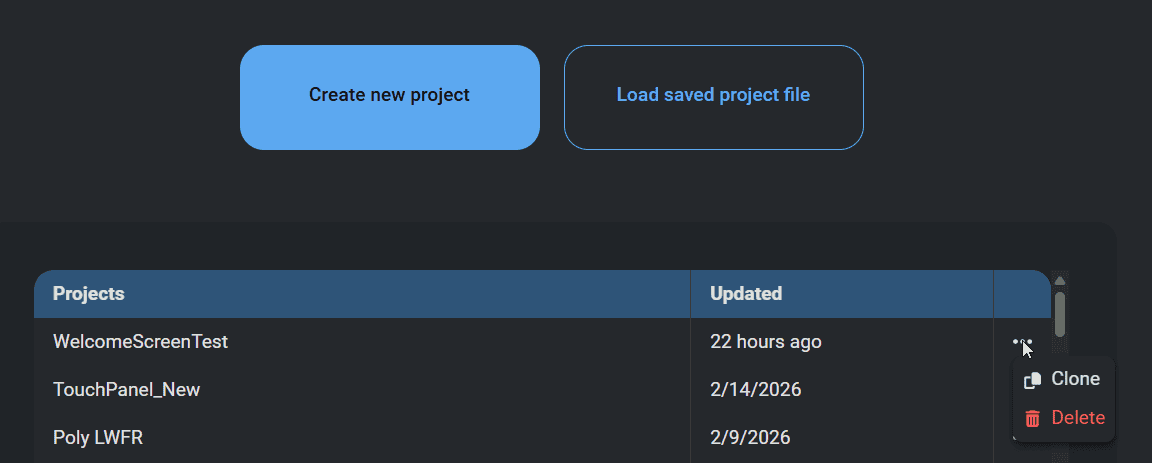
The design intent is simple: match the way integrators think. Sequential Wizard screens guide users through common workflows and present only the options needed at each step, lowering exposure to LARA’s internal complexity and eliminating the need for extra training. Clear visibility of projects reduces frustration and the likelihood of accidental changes in the traditional UI, while easy cleanup limits clutter and configuration drift.
Project Listing
See available projects instantly in the Wizard, so you can select the right configuration without digging through menus.
Project Cloning
Duplicate a proven setup in seconds and start from a reliable baseline instead of rebuilding from scratch.
Project Deleting
Remove obsolete configurations directly in the Wizard to keep your workspace clean and focused.
These improvements are designed to feel natural from the first click. The Wizard’s sequential screens follow a workflow integrators already know, reducing exposure to LARA’s deeper settings and lowering the risk of accidental changes that can happen in more complex interfaces. The result is a cleaner experience with less frustration, especially when moving quickly on-site or iterating during deployment.
In practice this means faster implementation of routine tasks, greater reuse of validated setups and fewer clicks spent searching or correcting mistakes. The update improves day to day efficiency for installers and system integrators who manage multiple room configurations or iterate on designs during deployment.

In practice this means faster implementation of routine tasks, greater reuse of validated setups and fewer clicks spent searching or correcting mistakes. The update improves day to day efficiency for installers and system integrators who manage multiple room configurations or iterate on designs during deployment.