
USB20 1GbE Configurator
SKU: USB20 1GbE Configurator
ShippingEffortless configuration for Icron-based Lightware USB extension devices
Details
Specification Table
| Minimum System Requirements | |
| Operating Systemᅠ | Windows 10 (64-bit) |
| CPU | ᅠSingle core 2.0 GHz |
| RAM | 2 GB |
| Storage | 300 MB free space |
| Display Resolutionᅠ | 1600 × 900 |
USB20 1GbE Configurator
It provides AV professionals with a clear, real-time view of the entire USB topology, highlights tier limits and connection issues, supports intuitive device pairing, and enables flexible routing between hosts and peripherals. This makes it easy to deploy, configure and troubleshoot even the most complex USB systems in boardrooms, auditoriums and control rooms.
USB Systems. Diagnosed. Controlled.
For AV professionals building boardrooms, auditoriums and control rooms. Visualise your entire USB topology, troubleshoot issues in seconds, and take full control of USB routing in one powerful Windows utility.
In modern AV environments, USB cabling can hide a wide range of problems. Hosts run into invisible tier limits, hubs and extenders add complexity, and critical devices can drop offline at the worst possible moment. The USB20 1GbE Configurator brings the full USB chain into a single clear view, helping you identify tier limits, understand where the system fails and route peripherals with confidence.
The USB Configurator gives AV professionals instant visibility into the full USB architecture so they can design and deploy systems that work reliably from day one.
By revealing the exact tier depth created by hubs, extenders and virtual hops, the tool highlights when a topology is approaching host limits that would otherwise cause devices to silently fail.
This tier-aware insight lets integrators validate system stability, eliminate hidden enumeration issues and ensure consistent USB performance in even the most complex AV environments.
The Challenge in AV Environments
In a typical AV installation, the table may be full of cameras, joysticks, docking stations, hub arrays and extenders. Everything looks correctly wired, yet the host still cannot see the device. The reason is usually hidden in the USB topology.
Key points
- MacBooks generally tolerate up to 5 USB tiers, while Windows hosts usually allow around 7.
- Every hub, extender or virtual hop adds a tier.
- If the limit is exceeded, the device will not enumerate even though it appears physically connected.
Common pain points
- Hidden topology issues caused by long extender chains or complex hub layouts
- Unpredictable failures in boardrooms, auditoriums or control rooms
- Time consuming troubleshooting for integrators and technicians
With complex systems that may include numerous pedals, joysticks and cameras on a single computer, you need clear insight rather than guesswork.
Who Should Use It and Where
This tool is built for real-world professional AV environments, including:
- Boardrooms and huddle rooms with USB cameras and conferencing systems
- Auditoriums and lecture halls with stage-level USB extension
- Control rooms using joysticks, pedals and rack-mounted USB peripherals
- Any installation where a host PC must manage many USB endpoints with full visibility
Works independently of Lightware hardware, making it ideal for pre-deployment testing and support diagnostics.
Getting Started and Download
The USB20 1GbE Configurator is available free of charge for Windows 10 (64-bit). Minimum system requirements are 2 GB RAM, 300 MB free disk space and a display resolution of 1600×900.
Why It Matters
- Reduce on-site troubleshooting time thanks to visual diagnostics
- Prevent support calls by detecting USB chain issues before deployment
- Deliver reliable AV systems and avoid unexpected device failures during meetings
Diagnostics in Action
Diagnose USB issues quickly and see exactly what is happening
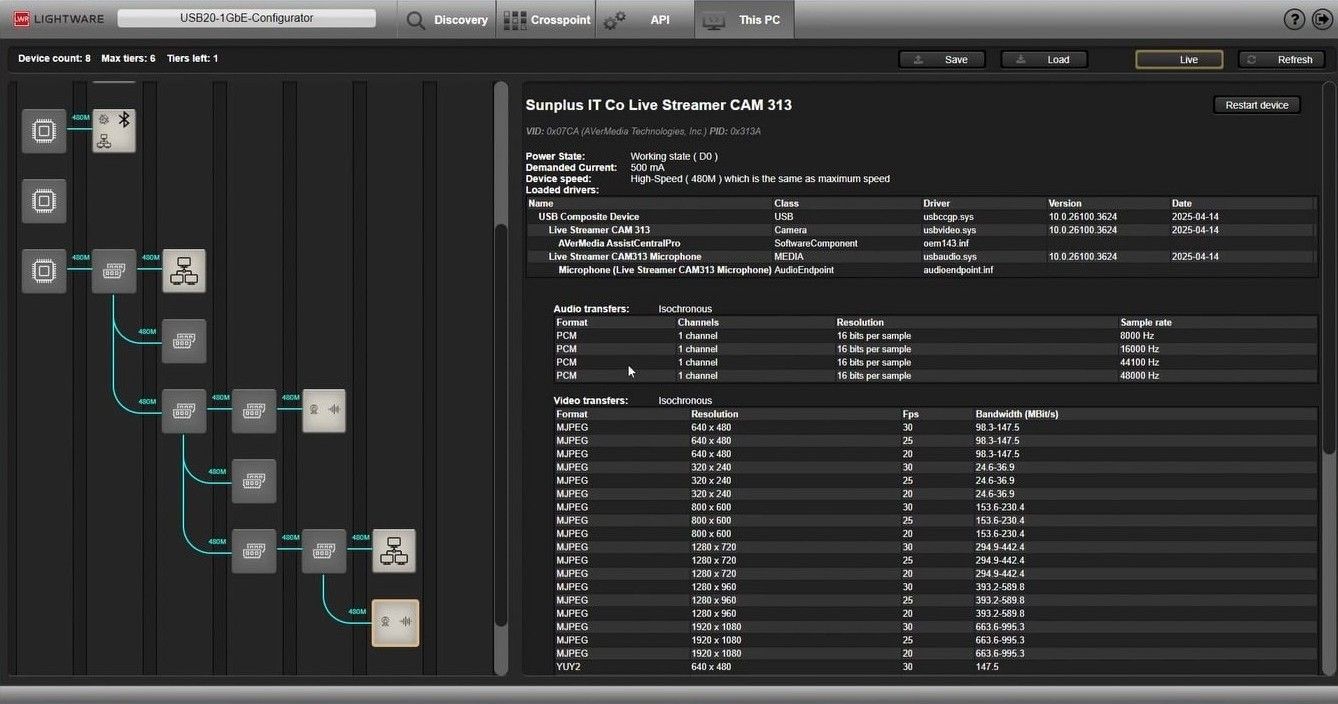
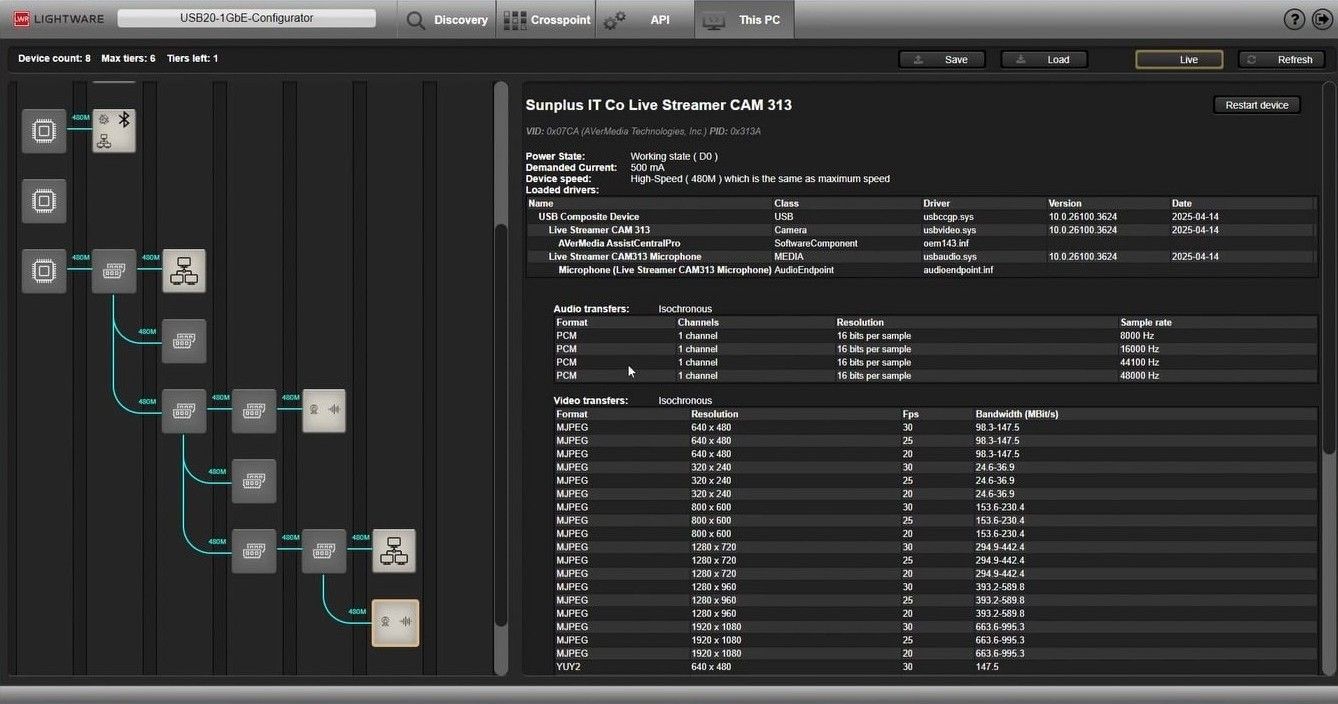
The diagnostics tab provides a clear, real-time tree view of the entire USB chain. Each hub, extender and device are mapped out visually, complete with driver information, bandwidth and hot-plug events. You can immediately see when a tier limit is reached and identify the bottleneck in the system.
USB Crosspoint and Routing
Full-scale USB Crosspoint routing for professional AV systems
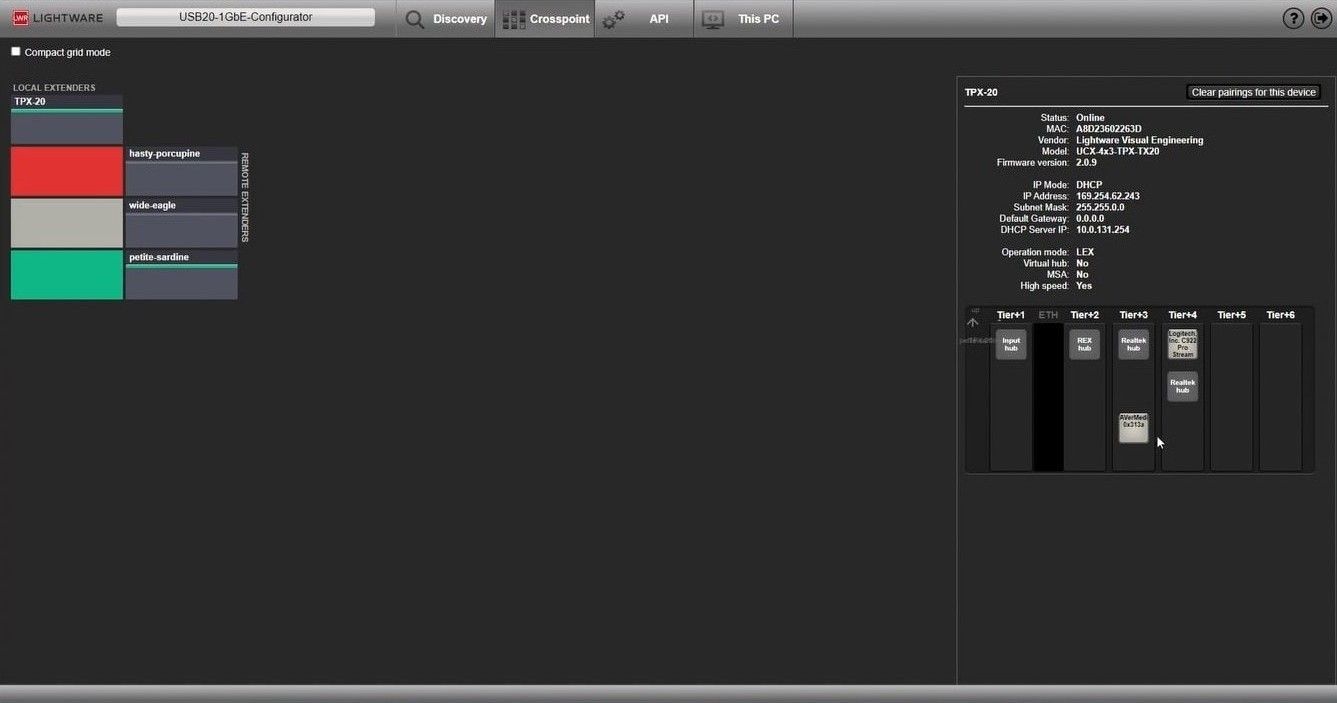
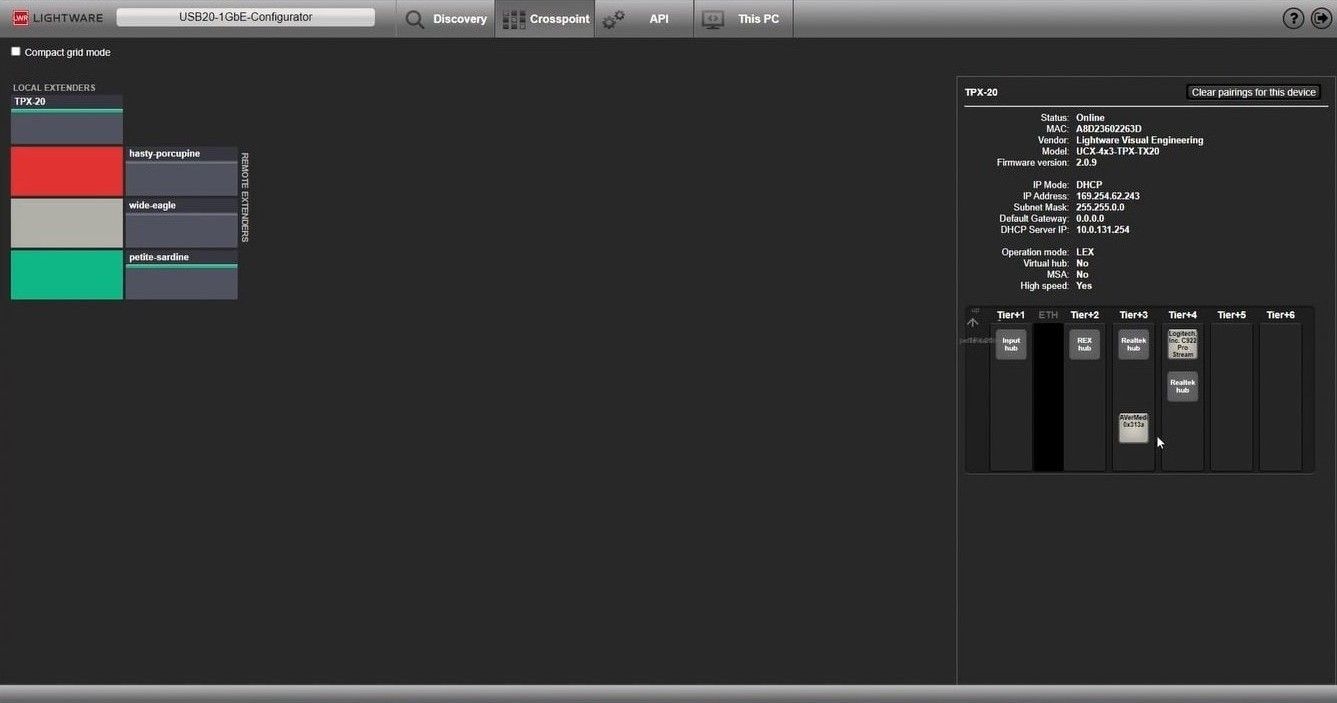
High-end AV installations often involve multiple hosts, table connections, cameras and control surfaces. In these environments, simple extension is not enough. You need flexible routing and dynamic host assignments. The software includes a visual crosspoint interface that lets you control which host sees which device and switch connections instantly.
FAQ and Support
Does this work only with Lightware hardware?
No. The diagnostics tab works independently, so you can use it with any USB host.
Can I export diagnostics data?
Yes. Sessions can be saved, reloaded and exported in JSON format for support use.
What about macOS?
The software runs on Windows 10. Diagnostics help identify tier-limit issues that often affect MacBook hosts.
What is a USB tier?
USB operates on a tiered-star topology. Each hub adds a tier. Exceeding the limit prevents devices from enumerating.
Features
Auto Device Discovery
Detects compatible USB extender devices on the network.
USB Role & Mode Configuration
Define LEX, REX or BiDi and select USB operating mode.
Crosspoint Interface
Route USB endpoints to hosts using a simple visual matrix.
Built-in REST API
Integrate USB routing into your AV control system.
JSON Import/Export
Save, restore and replicate configurations for support.
Configuration Validation
Checks setup for issues and ensures all devices are correct.
This PC – USB Diagnostics
A real-time tree view of the full USB topology, color-coded.
Automatic Update Notifications
Alerts when new software versions are available.
Related Products







15 products